Introduction
Buying your first security system is more confusing than it should be. There are cameras, sensors, alarms, apps, subscriptions — and every brand claims to be the one you need. When friends ask me about the best smart home security systems for beginners, I usually tell them to ignore the marketing first and figure out what they’re actually trying to protect against. A ground-floor apartment needs different coverage than an independent house with a garden. This guide breaks it down simply, without pushing you toward buying everything at once.
1. Figure Out What You’re Actually Protecting
Before comparing products, be honest about your risk. Are you worried about break-ins, package theft, or just want to see who’s at the door? These need different setups.
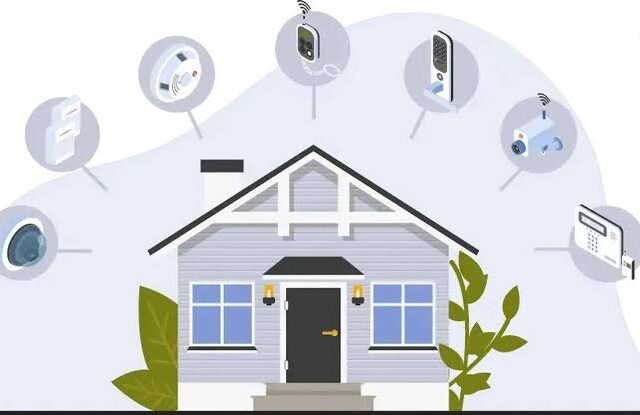
Quick answer: The best smart home security systems for beginners typically combine a video doorbell, one or two indoor/outdoor cameras, and door/window sensors — covering entry points without overspending on features you won’t use.
2. Start With a Video Doorbell
This is usually the single most useful device for first-time buyers. It covers your main entry point, alerts you to visitors, and doubles as a deterrent.
I’ve noticed most break-in attempts happen through the front door anyway, so this one device covers a lot of risk for a relatively small cost — usually ₹5,000-₹15,000 depending on features.
3. Add Indoor and Outdoor Cameras Strategically
You don’t need cameras in every room. Focus on entry points and common areas first.
- Front entrance: highest priority, covers deliveries and visitors
- Backyard or balcony: important if there’s outdoor access
- Living room: optional, useful mainly for monitoring while away
Direct answer: For first-time buyers, one outdoor camera at the main entrance and one indoor camera covering common areas is usually enough — expanding coverage later is easy once you know what you actually need.
4. Door and Window Sensors
These are cheap and often overlooked. A sensor alerts you the moment a door or window opens unexpectedly — useful even when you’re just in another room and don’t hear it.
Picture a small business owner in Jaipur who runs deliveries out of a home office. Door sensors let her know instantly when someone enters the storage room, even from the next floor.
5. Motion Sensors for Extra Coverage
Motion sensors work well in hallways or entry points where cameras might miss angles. They’re inexpensive — typically ₹1,500-₹3,000 per sensor — and pair well with existing camera systems.
6. Smart Locks Add a Layer Most People Skip
Not essential for a starter setup, but worth considering once basics are covered. Smart locks eliminate the need for physical keys and let you grant temporary access remotely — handy for domestic help or guests. [link to related smart home upgrades guide here]
Related reading: How to Secure Your Home While You’re on Vacation
7. Cloud Storage vs Local Storage
This decision matters more than people realize. Cloud storage means footage survives even if a camera’s stolen or damaged, but comes with a monthly fee. Local storage (SD card) is cheaper upfront but risky if the device itself is compromised.
Has this crossed your mind before buying? It’s worth deciding early, since switching later sometimes means buying new hardware entirely.
8. App Integration and Ease of Use
The best smart home security systems aren’t necessarily the ones with the most features — they’re the ones you’ll actually use consistently. If the app is confusing, most people stop checking it within weeks.
- Look for systems with a single unified app, not separate apps per device
- Check for offline alert options in case of internet outages
- Read recent reviews specifically about app reliability
Frequently Asked Questions
Q1: What’s a good starter budget for a smart home security system? ₹10,000-₹25,000 typically covers a video doorbell, one or two cameras, and a few door sensors — a solid starting setup.
Q2: Do I need professional installation? Most consumer smart security devices are designed for DIY installation. Complex multi-camera setups may benefit from professional help.
Q3: Is cloud storage necessary for home security cameras? Not strictly necessary, but recommended if you want footage preserved even if the device is stolen or damaged.
Q4: Can smart security systems work during power outages? Battery-backed devices continue working temporarily, but systems relying on Wi-Fi routers will lose connectivity unless you have backup power.
Q5: How many cameras does a typical home need? For most homes, 2-4 cameras covering entry points and common areas is sufficient for first-time setups.
Q6: Are subscription fees worth it for smart security systems? If cloud storage or advanced AI detection features matter to you, yes. Basic motion alerts are usually free across most systems.
Conclusion
Choosing the best smart home security systems doesn’t require buying every gadget available. Start with a video doorbell and one or two cameras covering your main entry points, then expand once you understand your actual usage patterns. Security should feel practical, not overwhelming — pick two devices from this guide and get started this week rather than waiting for the “perfect” complete setup.
Suggested Image Alt Text:
- “Video doorbell installed at home entrance for security monitoring”
- “Outdoor security camera covering backyard entry point”
- “Smartphone app showing smart home security system alerts”